


We’ve released an update for the IA Mobile BETA app (green icon) and IA Mobile v3 app (blue icon)
IA Mobile v3.18 contains minor improvements and bug fixes. In this version:
- Fixed result note (and other) keyboard issue with rich edits [reported by Mike Schwarzkopf and Joe Yoon, thank you both for the detailed report]
- Added the “Doc Reviewed” entity
- Login view shows the status of hardware permissions
- Improved active header buttons, requested item closeout checkbox, and highlight evidence observations
Reminder: New warning in iOS 9
iOS 9 has a new permissions popup related to Enterprise applications like IA Mobile
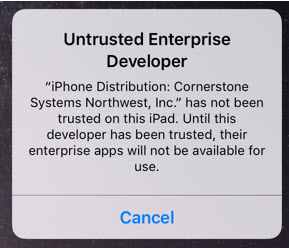
To allow IA Mobile to run:
- Cancel the warning dialog shown above if it pops up
- Tap the ‘Settings’ icon, then the ‘General’ tab
- Under the general settings, select the ‘Profile’ tab
- Select the “Cornerstone Systems Northwest, Inc.” tab
- Select the “Trust ‘Cornerstone Systems Northwest, Inc.’ ” tab
- A dialog will pop up, tap ‘Trust’
We’ve documented these steps along with accompanying screenshots on the distribution website