


IA-Desktop: User-impacting changes
- PAM sourcing for unit and system infrastructure data : This change will have minor impact the asset configuration steps for federal and state inspections
- Users will be able to organize units by inspection system instead of only by OPID when building assets
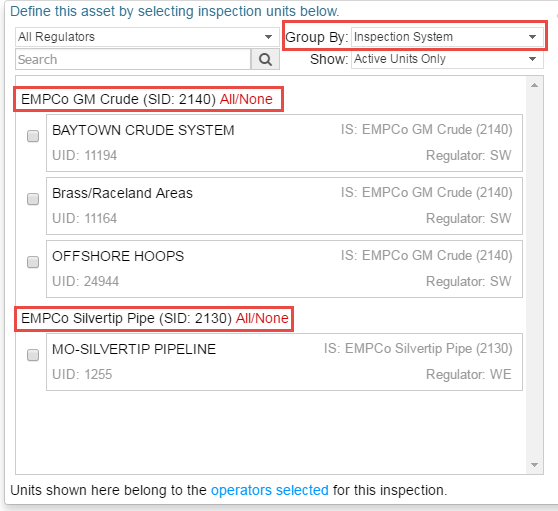
- State users with units managed in PAM will see those units in IA for asset building
- Assets based on custom units are still possible, but with some differences (see screen cast)
- PAM-sourced unit information will be available in several places in the IA Desktop interface.
- File attachments may now be made after the approval process has started : Supports the briefing report documentation policy which involves mid-approval process attachments. Inspection leads and/or supervisors are now able to record written preliminary findings report documentation during the approval process.
- Coverage Heatmap improvements :
- Now supports Data Forms coverage in addition to results
- Recognizes and displays excluded questions differently than questions with no results
- Columns may now be organized by Inspection System or Operator ID
- Links from questions to the planning interface and the inspection tab
- Primary and Secondary code reference link layout restored to main inspection tab view for easier code-reference scanning
- All data form multi-select fields can be cleared to default / empty values

- O&M Enforcement Guidance updated to current version (July 2017)
- Inspection Scoping Form wording clarified (applies only to new instances of the form)

- Improvements to the relevant inspections list - column filters and sorting
- Team builder table improved - now shows email addresses
IA-Desktop: Other changes
- Fixed some layout issues in the past-inspection dropdown
- Allowed the exclusion-indicator “x” to bubble up in the planning (and heatmap) grids when all the questions represented by a cell were excluded.
- Fixed background color of repeated question links
- Fixed planning tutorial errors
- Allowed expand and copy of text content for locked inspections.
- Planning panes now show more details when space allows, making reading the plan-items easier for complex plans.
- Improved task list show/hide performance
- Fixed issue with Exclusions Copy - pick list not appearing correctly
- Improvements in the handling of special typographical characters
- Inspection Scoping Form modified for PAM update reminder