


User Interface/Usability
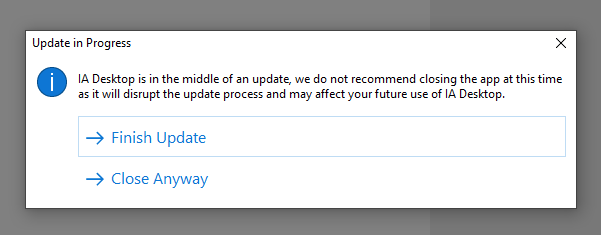
- Added a confirmation box when attempting to close out of IA Desktop while an update is in progress. Interrupting an IA update may cause the app to no longer function properly, and thus quitting the app during an update is not advised.
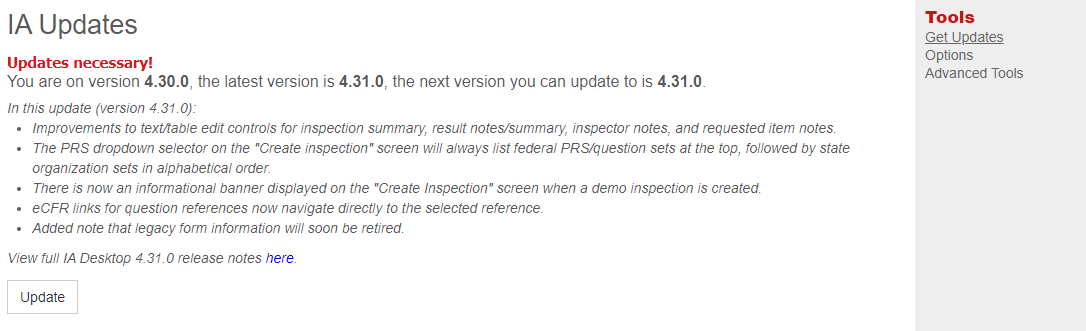
- Release notes information is now displayed on the “Updates” screen:
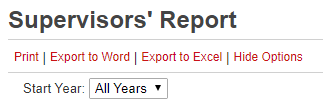
- Added “Start Year” filter to Supervisors’ Report:
- The IOR report now offers an asset filter:

- Post-Visit Verbal Briefing and Post-Inspection Written Preliminary Findings reports now offer the option to include Standard Issue Information:

- Added an activity link filter to the Construction Daily report (to filter to forms that are linked to a particular activity):

- Added an activity plan filter to the Post-Inspection Written Preliminary Findings report and IRR (to filter to results that fulfill part of a particular plan activity):

- Added information on average age of closed inspections to Monthly Open Inspection Report.
- Improved offline eCFR use:
- The cite that was navigated to will be highlighted for more efficient orientation.
- Improved granularity for eCFR links, for example, clicking “195.452(f)(3)” will navigate directly to that specific cite:

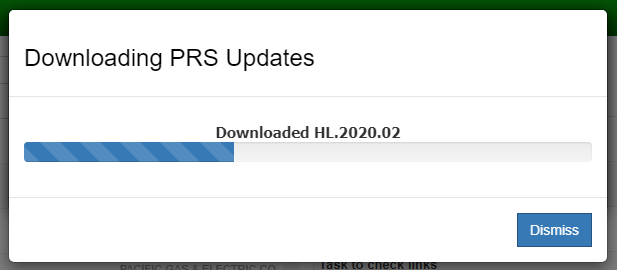
- The “PRS downloading” progress bar can now be dismissed to assist in cases where it may have gotten stuck. This will result in PRS sets not all downloading. However when an inspection is opened from the home list, any PRS sets relevant to it will download at that time if not already present.
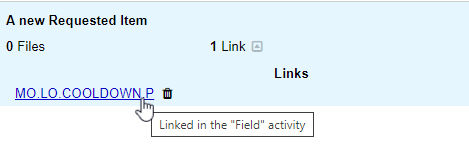
- Added a tooltip noting which activity a requested item is linked to when hovering over its question and result links:
- When quick switching between two inspections, IA will now drop the inspector back at their last visited point on the inspection tab.
Small improvements
- Improved messaging on UAT and training servers to remind that those servers are for testing and training only and not for real inspection work.
- Server reports will now make it more clear when an asset has no long/short name.
- Improved IA Desktop and server communication in order to learn of removed inspections more quickly.
- Improved warning messages for Standard Issue Cites.
- Removed validation report references to SMART.
- Fixed an issue where using the page up/down keys hid some user interface tools
- Fixed an issue that caused the app to navigate back to the overview tab when an inspection was first opened.