


User Interface/Usability
- Improvements to text/table edit controls for inspection summary, result notes/summary, inspector notes, and requested item notes.
- The PRS dropdown selector on the “Create inspection” screen will always list federal PRS/question sets at the top, followed by state organization sets in alphabetical order.
- In addition to the pre-existing help-glyph information which explains the retention policy for demos, there is now an additional banner displayed on the “Create Inspection” screen when a demo inspection is created:

- In-app eCFR link navigation improvement: Previously, eCFR links for question references would navigate to the parent reference. They now navigate directly to the selected reference.
- Added note that legacy form information will soon be retired.
Small improvements
- Increased the Planning tab’s resiliency to conflicts/multiple editors.
- Improved styling consistency for disabled text fields/controls.
- Reporting: improved the way in which asset names are displayed alongside results:
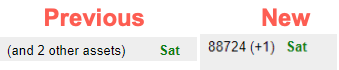
- Reporting: the names of removed assets will no longer be displayed on reports.
- Reporting: improved Asset filtering: items linked to no assets will be displayed by default (as before), and a new filter that will hide unlinked items is now available.
- Reporting: improved Validation Report warnings for results without an asset.
- Reporting: the Supervisor Report can now be sorted by any of the date columns.
- Reporting: added question title and ID to the Post-Inspection Written Preliminary Findings report.
- Reporting: on the Export Questions report, added a note to questions that are re-presented in order to more easily identify them.
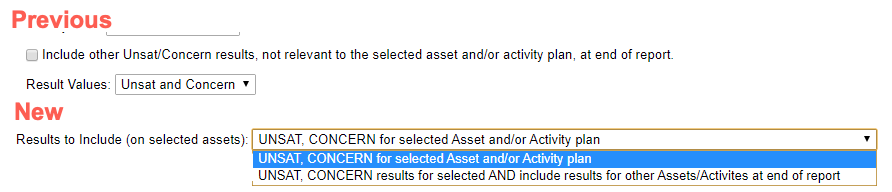
- Reporting: updated result filter on the Post-Visit Verbal Briefing Report to make it more user friendly:
- Improved auto-complete functionality for standard issue cites.
- Improvements to password change process.
- Adjusting sliders for Heatmap screening view will no longer generate an error notification.
- Fixed issue on planning tab where long asset names were not displaying properly.
- Fixed issue on Relevant Inspections tab where selecting a checkbox for an inspection caused the list to re-sort.
- When final review workflow tasks are pending, audit/inspector value of results cannot be modified.
- File attachment creation is no longer possible after supervisory approval has been requested.
- Improved user interface for editing description of workflow tasks and custom tasks on the Overview tab.