


User Interface/Usability
- Observers (inspection team members in the OBSERVER role) can now add/edit inspector notes.
- Updated offline eCFR content.
- Updated offline FAQ content.
- Improved autocomplete functionality and warnings when adding code cites to Standard Issue Items.
Small improvements
- Improved linking between eCFR code cites and their relevant FAQ and Enforcement Guidance.
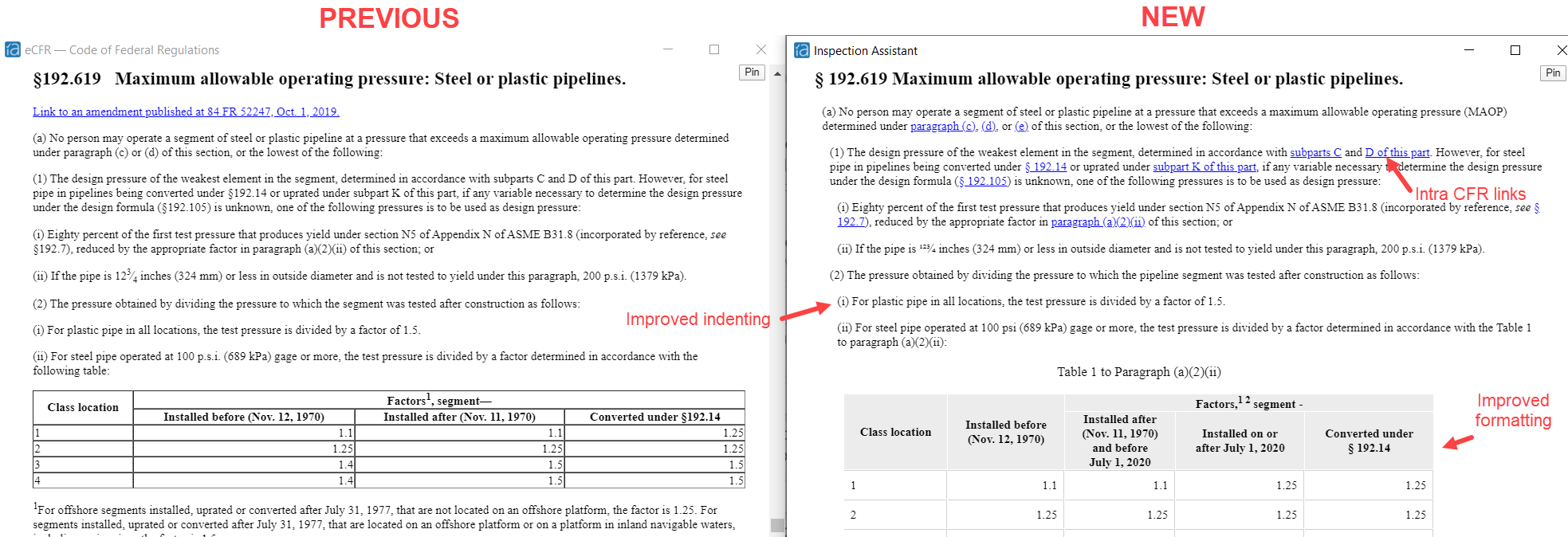
- Improved layout styling of offline eCFR (for inspections with a start year of 2022):
- Improved button arrangement for “delete”, “done”, and “cancel” on attachments:

- When the attachment export is complete, IA will automatically open the resulting attachment export folder.
- Quick-switching between inspections will now return inspectors to the navigational tab they last visited in each inspection.
- IA will better handle cases when an incorrect PIV certificate was selected during login with PIV card.
- Added new 6-9 month row and column to “Open inspections by age and dormancy” matrix on MOIR report.
- Improved role permissions so that only a team member in the DIRECTOR role may modify regulatory action and regulatory action notes.
- Fixed: special characters in reports will now display correctly.
- Fixed: assignees were unable to delete custom tasks they had created.
- Fixed: error generated when attempting to update a task description.
- Fixed: “always expand results on create” option did not expand the result panel for Sat results.
- Fixed: issue with some attachment titles not updating in IA Desktop.
- Various security and performance updates to underlying software libraries.