


User Interface/Usability
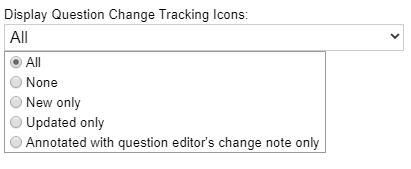
- Inspectors now have the ability to select which “question change tracking” icons they see on the planning tab and inspection tab. This can be done by visiting the “Help/Tools” tab and clicking on “options”:
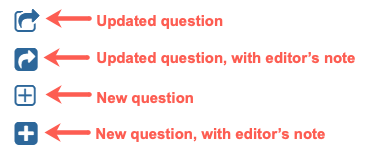
- Improved the visual distinction between new/updated questions and those that are new/updated and have been annotated with a note by the question editor. Any new/updated question has an unfilled blue icon. If an editor’s note about the change is present, it will be filled in:
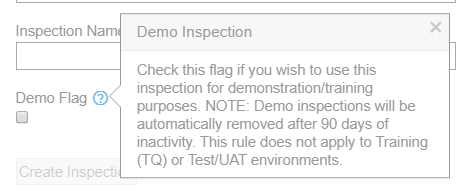
- Implementation of the demo inspection retention plan: demo inspections that have been inactive for 90 days will be removed. Note that the info glyph next to the “Demo” checkbox on the Create Inspection screen will communicate this information:
- Improvements to attachment date range filters. Use the “set to earliest” and “set to latest” links to auto fill the start/end dates to the dates the first and last attachment were added to the inspection:

- Attachment export button/functionality added to question, result, and form attachment tab.
- Retirement of the following reports: Inspection Briefing (legacy), Inspection Completion Status, Plan Selections.
Small improvements
- Improvements to make the Attachment Export process quicker and smoother.
- In the MS Word document produced by the Attachment Export, fixed an issue where links to attached images and documents would break if the exported folder was moved or renamed.
- Fixed result panel dimensions so that it properly adjusts as the inspection tab’s right side panel expands and collapses.
- Improved performance of the attachment tab, including the attachment map view.
- Improved behavior of attachment filters when displayed on a question, result, or form’s attachment tab.
- Fixed bug where heatmap screen affected scrolling behavior of the general reports tab.
- Removed “questions in planned groups” option from local Question Export.
- Improvements to MOIR report generation.