


There are no process changes in this update. There are one or two new features to be aware of, particularly if you work with a large number of file attachments. Here are the highlights.
New Features
- IAD now supports direct drag-and-drop from windows folders into IA attachments. This feature is worth knowing about if you do a lot of file attachment management.
- IAD supports direct copy-to-clipboard of images in attachments. This feature will be most useful for those needing to copy photos from IA into documents or emails.
Other Improvements
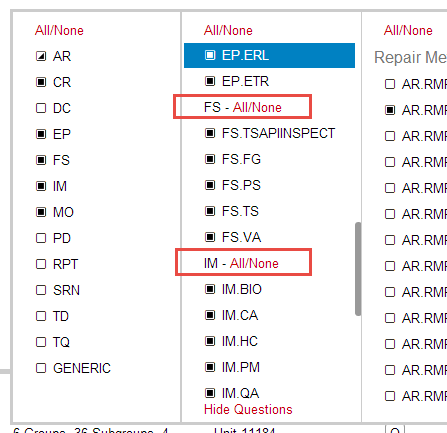
- Planning interface now includes subgroup-headings with their own All/None action links. This makes it easier to fine-tune your subgroup selections when planning.
- Attachments saved with empty titles/names will get a temporary default name assigned (instead of just being blank). This will avoid “no name” attachments that are hard to find later.

- Large performance improvements for the attachments lists when photo thumbnail images are visible.
Other Changes
- (confirm)/(detail) Question suffixes are removed from the question export report for PRSs that’d don’t make that distinction (2016 +)
- Warn user when assigning a ISFORM to an asset with more than one underlying external_scope_ID (unit)
- Make year-entry in ISFORM is now keyboard friendly (mouse not required)
- Removed “attachments” tab and “config” link from overview. These links were left in as a transition step when we added tabs for these functions.
- Warning on Asset config screen when asset IDs are not selected
- Mitigated issues that occur when very large text blocks are pasted into textareas.
- Better display of asset names (shows long names in the expanded controls now, for easier identification)
- Configuration tab performance improvements
- “Must-Have-Supervisor” validation rule was relaxed to allow DIRECTOR or SUPERVISOR.
- Other minor bug and performance fixes