Application Features
- DIMP Inspections: DIMP inspections are now possible in IA. Just add a new inspection and select the “Gas Distribution” inspection type. Also two supporting DIMP data forms have been added.
- PRS Search: Users can now search for any word, phrase, or code reference across all questions available in the inspection.
- Overview Bar Links: Users can now quickly see which questions are contributing to the various segments of the progress bars for any activity.
- Recent Question Links: Users can now quickly return to questions they recently visited by clicking a link in the inspection tab sidebar.
Report Features
- Inspection Briefing no longer has a Tabular format option. Instead, use the IRR (next item) to list Unsats/Concerns in a tabular format.
- Inspection Results (IRR) Report
- Option for Asset-specific Tabs. Users can now see results in asset-specific tabs.
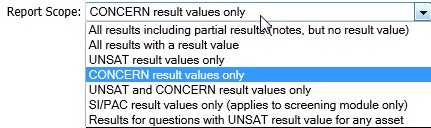
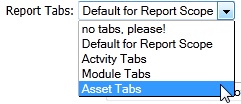 NOTE: because Results can apply to multiple Assets, using the Asset Tabs option will necessarily result in double-counting such that: the same result appears in more than one tab; and the tab totals will sum to more than the total number of distinct results. 2. Report Scope includes an option for Concern only:
 3. Bug fix when “truncated” option was used with Full Text [fix already released as of 8/10. Fix also active for same issue in the validation report]
Additional Improvements
- Smoother navigation to questions not in the current presentation
- Links to Release Notes, Content Feedback Revisions and FAQ added to Help/Tools
- Performance improvements for smoother scrolling in the Inspection tab on large inspections
- Smoother updating for clients with old versions who have never previously logged in
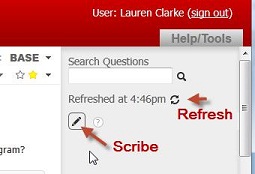
- The inspection tab sidebar was de-cluttered and the scribe toggle button easier to click and more visible when scribe is engaged.